
CarRx by Elo GPS
Connected Dealer Services, LLCAuto & Vehicles
4.652.00 Reviews
- Version
- 3.3.4
- Installs
- 10.00K
- Age Rating
- Everyone
Screenshots
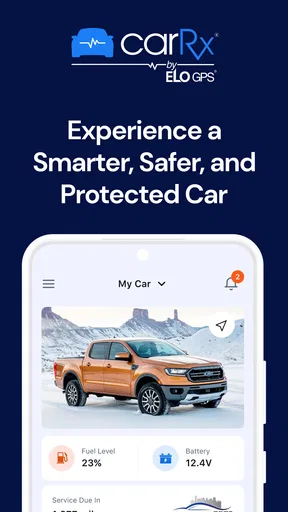
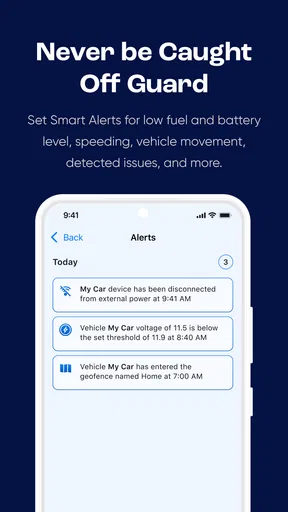
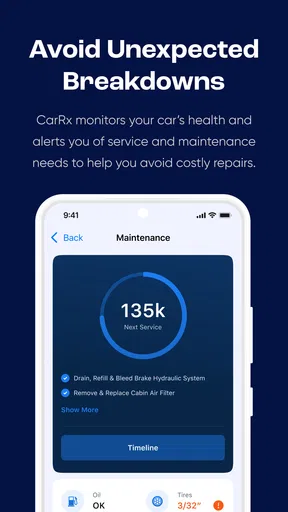
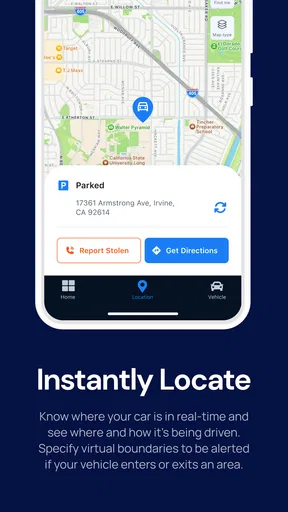
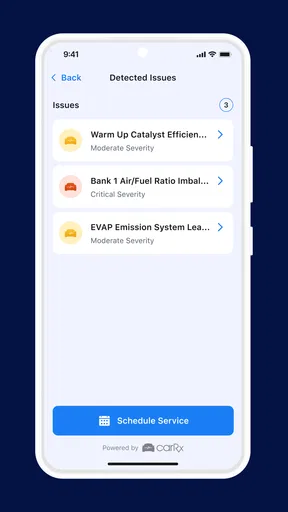
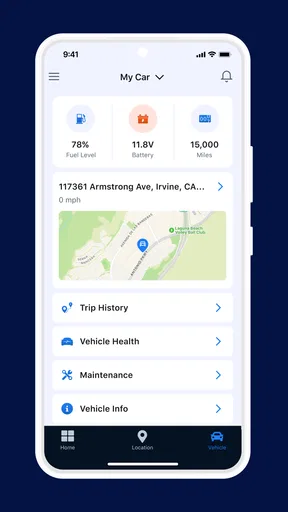
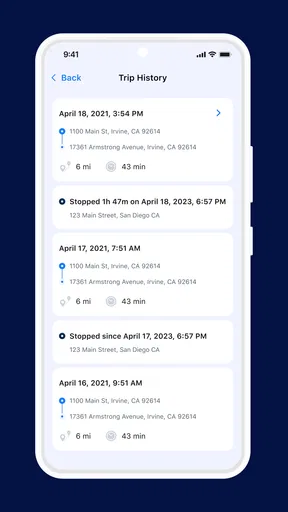
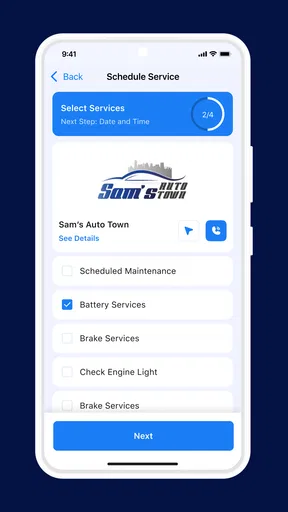
Our Review of CarRx by Elo GPS
 Analysis by Appyee
CarRx by Elo GPS is the kind of car app I would approach with a practical question: can it make everyday vehicle ownership feel more informed and less stressful? Its focus is straightforward—helping create a smarter, safer, and more protected car experience—but the real value depends on how well it fits your routine. I found it most appealing as a companion for drivers who want their vehicle information closer at hand instead of relying only on memory, paper records, or a last-minute visit to a mechanic.
The app sits in the Auto & Vehicles category and is developed by Connected Dealer Services, LLC. It is free to use, carries an Everyone age rating, and has reached over ten thousand installs. That makes it accessible to a broad range of drivers, including people who are not especially comfortable with technical automotive tools. The current release is version 3.3.4, and it works on Android seven and later.
What to expect before you begin
I would not approach CarRx as a replacement for a mechanic, an emergency service, or the vehicle’s own dashboard. Its role is more useful when understood as a digital layer around car ownership. It can help you stay connected with the condition and protection of your vehicle, but it does not turn a phone into a complete diagnostic workshop. That distinction matters because it sets a realistic expectation from the start.
The store summary presents the idea as “Smarter, Safer & Protected Car,” while the short description identifies the product as CarRx. In everyday terms, I read that as an app intended to support awareness and ownership habits rather than simply provide another generic driving utility. If you are looking for directions, fuel prices, traffic information, or a standalone maintenance calculator, this is not the first app I would choose. Its appeal is narrower and more vehicle-centered.
The public response is encouraging without being so large that I would treat it as unquestionable proof. CarRx has a 4.6 average from roughly three hundred ratings, with just over fifty written reviews. I see that as a useful sign that the basic experience has worked well for many people, while still leaving room for individual differences based on the vehicle, connected service, and the way each driver uses the app.
Before installing, I would have the vehicle information and any details associated with its connected service nearby. This simple preparation can make the first session much smoother. A car app often feels confusing when the user is trying to remember identification details, locate paperwork, and decide what each screen means at the same time. Spending a minute getting organized is more valuable than rushing through setup and wondering later whether the correct vehicle was added.
For a first-time user, the most important mental model is this: CarRx is useful when it becomes part of a repeatable ownership routine. Opening it once out of curiosity is unlikely to show its full value. Checking it when preparing for a trip, reviewing a concern, or trying to keep track of the vehicle’s broader status gives the app a clear purpose.
Getting through the first setup
I would begin by installing the app from the official Android store and opening it somewhere quiet, rather than while sitting in a crowded parking lot or preparing to leave. The first session should be treated as an orientation period. Read each prompt carefully, use the vehicle information associated with the correct car, and avoid guessing when a detail is unclear. A wrong starting association can make later information seem unreliable even when the app itself is working correctly.
The developer is Connected Dealer Services, LLC, so users should expect the experience to be built around a connected dealership and vehicle relationship rather than a completely anonymous automotive tool. That is an important practical point. Someone who received the app as part of a vehicle-related service may find the setup more natural than a driver who downloaded it without knowing how the connection is supposed to work.
I would also take a moment to understand the difference between an app screen and a confirmed vehicle condition. A notification, status item, or reminder should be treated as information to consider, not as a final mechanical diagnosis. If something looks serious, the sensible next step is to check the vehicle safely and consult a qualified professional. The app can help you notice and organize concerns, but good judgment still belongs with the driver.
One useful setup habit is to decide in advance what “success” means for the first session. For me, it would be seeing the correct vehicle represented and knowing where to return when I need an update. That is better than trying to explore every possible area immediately. A clean, verified starting point reduces the chance of confusing a setup issue with a vehicle issue.
Another practical tip is to complete the initial work while you have stable phone access and enough time to read. If the app needs a connection to recognize your vehicle or service relationship, interruptions can make the process feel more complicated than it really is. I would not repeatedly tap through screens just to finish quickly. Instead, I would pause at any step that asks me to confirm the car, because that confirmation is more important than speed.
The first meaningful success
The first genuinely useful moment should come when CarRx gives you a dependable place to check your vehicle-related information. Once the correct car is connected and the main screen makes sense, I would immediately test the app against a real ownership task. For example, before driving to another city, I might open it to review the vehicle’s available status and identify anything that deserves attention before departure.
This is more valuable than simply opening the app and closing it again. A real task tells you whether the information is presented clearly enough to guide a decision. Can you find the relevant vehicle view without hunting? Can you tell which items are current and which require follow-up? Do you know what action to take if something concerns you? Those are the questions that determine whether the app earns a place in your routine.
A realistic everyday scenario would be a driver preparing for a long weekend trip. Instead of relying on a vague feeling that the car is probably fine, I would use CarRx as one part of a short pre-trip check. I would look at the vehicle information available in the app, then separately inspect the tires, lights, fluids, and dashboard warnings. If the app raises a concern, I would investigate it before leaving rather than treating the phone screen as permission to ignore physical checks.
That workflow reveals one of the app’s strongest practical qualities: it can help turn car care into a deliberate process. Many drivers do not ignore their vehicles intentionally; they simply have no convenient moment to think about them until a warning appears. A connected car app can serve as a prompt to pay attention earlier. The benefit is not that it eliminates responsibility, but that it makes responsibility easier to remember.
I would save another useful test for after the first successful session. Close the app, return later, and see whether you can reach the same vehicle view without repeating the entire learning process. An app that is helpful during a calm setup but awkward during a rushed real-world check will not become a reliable habit. CarRx makes the most sense when the path from opening the app to understanding the car feels uncomplicated.
Where new users may become confused
The biggest likely source of confusion is assuming that every vehicle-related question has a single answer inside the app. Automotive information is layered. A connected status can tell you something useful, but it may not explain the physical cause of a problem or replace an inspection. I would keep that boundary in mind whenever the app presents information that sounds reassuring or concerning.
Another point to watch is the relationship between the phone and the car. A phone application may display information associated with a connected vehicle service, but that does not mean the phone itself can observe every mechanical detail in real time. If a screen seems incomplete, I would first check whether the vehicle is correctly associated and whether the information is expected to update through the connected service. I would not assume that a quiet screen proves that nothing needs attention.
Users may also wonder whether CarRx is suitable for more than one vehicle. The answer depends on how their connected service is arranged, so I would avoid assuming that adding another car works exactly like adding the first. If you manage several vehicles, take extra care to identify which one is active before acting on any status or reminder. Confusing a family car with a work vehicle would be a much more serious mistake than simply needing an extra tap.
Privacy and account comfort are also reasonable considerations for a connected vehicle app. I would read the app’s own prompts and service terms during setup, especially if you prefer to keep your automotive information separate from other digital accounts. That does not make CarRx unsuitable, but it does mean the app is a better match for people who accept the convenience of a connected service in exchange for managing another digital relationship.
There is also a human limitation: the app cannot make a neglected car healthy by itself. If you only open it after a warning, you may miss the preventive value of using it as part of a regular check. I would place it alongside simple habits such as noting unusual sounds, checking tires visually, and keeping service appointments. The best result comes from combining digital awareness with physical attention to the vehicle.
For drivers who want detailed technical readings, repair procedures, or enthusiast-level diagnostics, a specialized scan tool and a trusted mechanic may be better choices. CarRx is more approachable than a technical diagnostic system, but that accessibility also means it should not be judged by the standards of a workshop instrument. Its strength is helping ordinary owners stay oriented, not giving them every possible engineering detail.
How it compares with familiar alternatives
The usual alternative is doing everything manually: checking the dashboard, keeping service notes in a paper folder, and calling a dealer or repair shop whenever something feels wrong. That approach can work, especially for a driver who already has a disciplined maintenance routine. CarRx becomes more attractive when you want a single digital starting point for vehicle awareness and protection rather than scattered reminders and memory.
It also differs from generic maintenance reminder apps. Those tools are often useful for entering oil changes, tire rotations, and other dates yourself, but they depend heavily on accurate manual input. CarRx’s connected-car orientation gives it a different purpose. I would choose a generic tracker when I mainly need a personal service log, and CarRx when I want the vehicle relationship and available status information to be part of the experience.
Compared with a dedicated diagnostic adapter, the trade-off is simplicity versus technical depth. A scanner can be the better option for someone who wants to read codes, investigate a recurring fault, or work on a car personally. CarRx is more suitable for a driver who wants reassurance, awareness, and a clearer ownership routine without learning a diagnostic vocabulary first.
It is also not the same as a navigation or roadside-assistance app. Those products are built around getting somewhere or obtaining help during a breakdown. CarRx is more useful before that crisis, when you are trying to understand the vehicle you depend on and notice issues early. If your main need is immediate roadside support, I would look for a service designed specifically for that situation instead.
The free price removes an obvious barrier for curious drivers, but free does not automatically mean universally useful. The real question is whether your vehicle and connected-service arrangement make the app relevant. Someone whose car is not supported by the expected connection may gain less from it than someone who already has a compatible relationship through their vehicle service provider.
Who should use it, and who should skip it
I think CarRx is a good fit for first-time connected-car users, busy drivers, and households that want an easier way to stay aware of a vehicle without becoming automotive experts. It can also suit people who tend to postpone maintenance decisions because they are unsure what deserves attention. Having a dedicated place to begin can make the next step feel less intimidating.
It may be particularly useful for a family sharing responsibility for one car. One person can use the app as the starting point for a pre-trip check, while another can still confirm the basics in person. The app does not remove the need for communication, but it can give everyone a common reference instead of relying on one driver’s memory.
I would be more cautious about recommending it to a driver who wants deep mechanical control, extensive customization, or a complete maintenance ledger. In those cases, a diagnostic tool, a detailed service-record app, or direct communication with a mechanic may be more appropriate. I would also skip it if I had no clear connection between the app and my vehicle service, because the setup effort would be difficult to justify without a meaningful vehicle view afterward.
Older Android users should check compatibility before planning around it. The minimum requirement is Android seven, which covers many devices but not every phone still in circulation. The Everyone rating makes the app broadly suitable from an age perspective, though younger users should still use any vehicle-related information with an adult’s guidance.
My next-step routine after installation
After the first successful check, I would avoid opening CarRx randomly. I would attach it to moments that already happen: before a longer drive, when a dashboard warning appears, after returning from a service visit, or when another household driver reports something unusual. This gives the app a job and makes it easier to remember.
I would also keep a simple boundary between what the app tells me and what I personally verify. If the vehicle looks normal in the app but feels different on the road, I would trust the physical warning and seek advice. If the app highlights something but the car seems normal, I would investigate rather than dismiss it. That two-way check is a more responsible workflow than treating either the phone or the dashboard as infallible.
My overall impression is positive because CarRx aims at a real ownership problem: drivers often need a clearer connection between their vehicle and the decisions they make around it. Its 4.6 average suggests a strong reception among current users, and the free entry point makes trying it uncomplicated. Still, I would recommend it with a specific expectation: use it as a connected awareness tool, not as a substitute for inspection, maintenance, or professional diagnosis.
If that matches what you need, the first meaningful goal is simple. Install the app, identify the correct vehicle, learn where its main information appears, and use it during one real pre-trip or vehicle-check moment. If that process gives you a clearer answer about what deserves attention, then CarRx has already proved its value. If you are searching for advanced diagnostics or a complete service history manager, I would choose a more specialized alternative instead.
For me, that balance is what makes CarRx worth considering. It is approachable enough for a first-time user, specific enough to support everyday vehicle awareness, and honest to evaluate when paired with the limits of connected automotive software. The app is at its best when it helps you notice, decide, and follow up—not when it encourages you to stop paying attention to the car itself.
Verdict
Strengths of CarRx by Elo GPS
- Tracks vehicle location and trips in near real time.
- Geofencing alerts can help monitor when a car enters or leaves an area.
- Driving history makes it easier to review routes and vehicle use.
- May help recover a vehicle by providing location data after theft.
- Useful for families or businesses managing several vehicles.
Limitations of CarRx by Elo GPS
- Requires compatible Elo GPS hardware and an active service plan.
- Location accuracy can drop in tunnels, garages, or weak-signal areas.
- Background tracking may increase phone battery and mobile data usage.
- Alerts depend on network coverage and may occasionally arrive late.
- Some features may vary by vehicle, device model, or subscription level.
Similar Picks in This Category
View All
Android Auto
Google LLC4.1

maxim — order a taxi & food
PT. SITO4.7

Штрафы ГИБДД: проверка с фото
Pays LLC – Штрафы ГИБДД4.7

Номерограм – проверка авто
Авто Ассист4.8

Дром Авто
Дром4.9

Frequently Asked Questions
What is CarRx by Elo GPS, and what does it do?
CarRx by Elo GPS is a vehicle-focused application designed to work with compatible Elo GPS hardware and services. It can help users review vehicle information, monitor selected driving or location data, and access connected-car features from a mobile device. The exact tools available may depend on the installed tracker, subscription plan, vehicle setup, and permissions granted during configuration.
Is CarRx by Elo GPS compatible with every car and smartphone?
The app is not necessarily compatible with every vehicle or phone by itself. CarRx is generally intended for users with compatible Elo GPS equipment or an account provided through a participating service. Before downloading, check the official listing and your provider’s requirements for supported Android or iOS versions, required tracking hardware, account activation, and any vehicle-specific installation conditions.
Does CarRx by Elo GPS require a subscription or additional hardware?
In many cases, connected vehicle applications such as CarRx rely on an installed GPS device, an activated account, or a paid service plan rather than functioning as completely standalone apps. The download may be free while tracking, cellular connectivity, storage, or premium monitoring features are billed separately. Confirm pricing, contract terms, installation costs, and cancellation rules with Elo GPS or your service provider.
What permissions and personal data does CarRx by Elo GPS use?
Depending on the features enabled, CarRx may request access to information such as location, notifications, account details, and device connectivity. These permissions can support vehicle tracking, alerts, and account management, but users should review them carefully before accepting. It is also worth reading the app’s current privacy policy to understand how vehicle, location, and usage data are collected, stored, and shared.
Can CarRx by Elo GPS track my vehicle in real time and work without mobile coverage?
The availability and accuracy of live vehicle information depend on the GPS hardware, cellular network coverage, device power, account status, and the refresh settings used by the service. GPS may determine a position, but the tracker still needs a communication connection to send updates to the app. In areas with weak coverage, information can be delayed, unavailable, or displayed as the last recorded location.
